Summary Assets
Locations in CenterScape can have optional Summary Assets scoped to their location. A summary asset is a construct like a room, server rack, building or other similar type that represents the type of location that the node in the location tree represents. These summary assets can use calculated fields to provide data based on assets detected or assigned to their locations. A more detailed description of these functions can be found later in this documentation. Common summary assets used in data center applications are Racks, Data Center, DC Room, IT Room, Wiring Closet, DC Loading Dock, DC Storage Room, and Row of Racks. These are created at different levels in the location tree as follows.
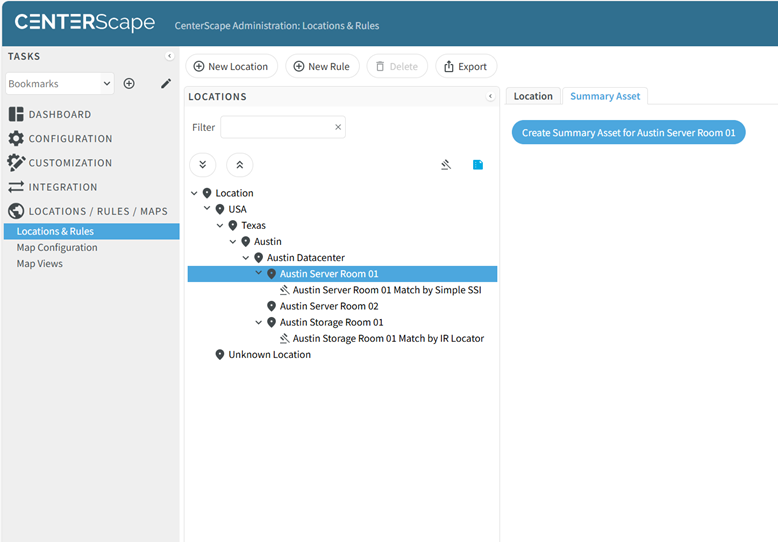
With the location that needs a summary asset highlighted click on the Summary Asset Tab. In this case the Austin Server Room is selected. Click the “Create Summary Asset for [Location Name]”.
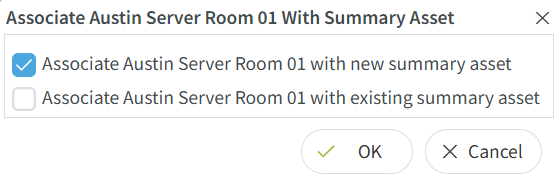
In most cases a new summary asset will need to be created so select Associate [Location Name] with new Summary Asset and click OK.
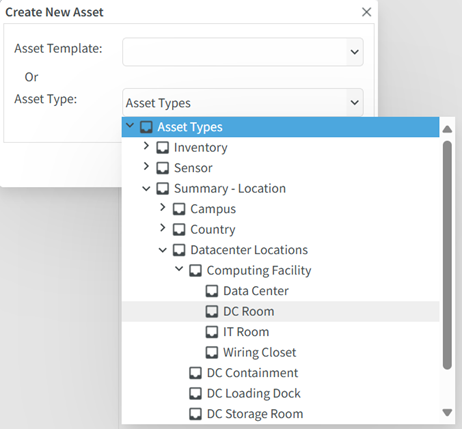
In the Asset Type dialog, a collection of types are located under the Summary – Location tree. These asset types are designed for use as Summary Assets. In this case under Datacenter Locations -> Computing Facility are a selection of rooms used for production space in data centers and IT spaces. Since this is a server room and not a big datacenter room DC Room is selected. A summary asset can be deleted and a different used if a better selection is later found to be more appropriate or if a custom summary asset is created.
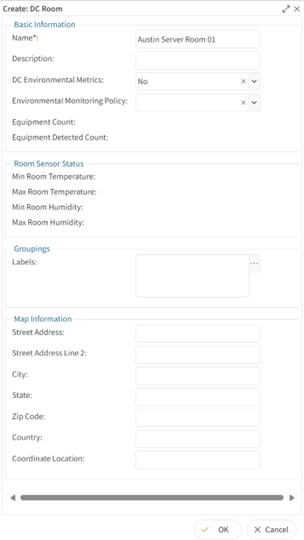
Each Summary asset will present different attributes based on the context of the type. Only attributes with the red asterisk are required to be supplied in the form. Click ok to complete the creation.
When a summary asset is assigned to a location a blue icon will indicate that the location is scoped to a summary asset. Each node in the location tree can only have one summary asset assigned to it.